FPAC (FrogPad Auto-Correct) Technology Preview
'cos Technology Preview sounds better than demo or prototype...
Downloading this link to your hard drive gets you a Java application to demonstrate an auto-correction method created for the FrogPad keyboard layout (use the control-click, or right mouse button, or whatever your OS/Browser does to download files. But just plain clicking on it gets you a screen full of mess, so try not to do that...)
Once all 24k of the download completes, double click on the application named FPACDemoApp.jar in wherever the download went to, and if Java is behaving, you should have a shiny new toy to play with.
You'll get a one line text input box and a text output box underneath it (you might recognise this from Sun's KeyEventDemo from which the interface was borrowed...) Give the input box focus and use your FrogPad to type stuff. The clever bit happens when you start deliberately mis-typing words but using the right keys, for instance instead of typing "the", you type "thz", "tle", "che" or an all out crazy "clz", and the program will auto-correct the word to "the".
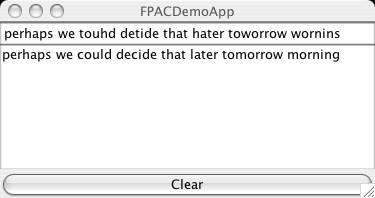
If the demo cannot match the word you entered, it will just display whatever you wrote but in capital letters so you know that word wasn't recognised.
The point of this is to demonstrate whether the FrogPad can be made easier to use if the computer figured out what you were trying to type, so you could occasionally mess up pressing the correct modifier button but your typing will still make sense. Not that it's a perfect concept, there might be occasions when you really do want to type "arihity" instead of "ability" (or some other more valid word that you don't want auto-corrected...)
Try putting the FrogPad in Sticky Symbol mode then typing sentences. Hah, take that, infernal sticky symbol key!
Potential uses:
- People who have difficulty using the modified keys because their hands refuse to co-operate with all that stretching and pressing two keys at the same time.
- People with small hands where monkeying around with all those modifier keys is a big nuisance.
- Fast typists who occasionally forget which modifier key to use.
- Lazy typists.
Caveats:
- Only the first 1786 most frequently used words in the English Language are known to the demo application, covering approximately 87% of an average written document (which didn't hold true on a "the cat sat on the mat" test since "sat" and "mat" weren't in there, hmpf!) Names of people and a lot of things aren't anywhere near the dictionary so they're really unlikely to work.
- Only the space key is used to figure out that you've finished typing a word and the demo can go off and try to do an auto-correction. Otherwise you'd be looking at a predictive text application rather than an auto-correct.
- The demo will only auto-correct words where the modifiers went wonky; it won't correct typos - that's what spelling checkers are for. And even then, this demo thing only corrects the Space, Symbol and Shift/Space and Symbol/Shift modifiers - numbers haven't been accounted for.
- This demo doesn't care about capital letters, tenses, plurals, punctuation, er, actually anything that isn't just a plain basic word dragged out of a list of the top 2000 most frequently used (duplicate entries chopped the list down to 1786 in case you were wondering...) This does mean if you type a word with a full stop at the end, it won't get auto-corrected.
- This was developed using a left handed iFrog on OS X.3.5 using whatever Java was installed by default (1.4.2, I think...), and Swing (so the interface will look about right on whatever computer you're using.) With all that going on, there's no guarantee this is going to work on any other configuration. There's no support for this thing - it'll either work on your setup or it won't.
- I'm sure you could break the demo if you tried hard enough. I'm not bothered - this is a proof of concept, not a polished application. Er, and don't be expecting much more than a prototype plaything right now unless my enthusiasm can be piqued.
- This is a rather shoddily engineered piece of software (hey, it's an afternoon's mucking about) so it is really inefficient. It's just to prove something like this can be done and to figure out how useful it could be.
Future possibilities if I ever decide to do anything further with this thing:
- Making this a text extra so it can be installed into OS X.3 and work on just about any application that accepts text.
- Making the dictionary lookup a whole lot more efficient.
- Bigger dictionaries/user dictionaries/learning dictionaries.
- A method to manually select which correction to use when there is more than one possibility (like "point" and "joint" are the same because the J is on the same key as the P.)
- A method to specify the default correction - you might type point a lot but hardly ever type joint so having joint as the default correction is going to be a nuisance at some stage.
- Figure a way around that punctuation business (punctuation is currently taken as part of a word when auto-correcting because the symbol modified keys share the same space as letter keys.)
- More robustness and other polishing stuff that takes the fun out of mucking about with prototypes like this on a Saturday afternoon...
Last updated: 7 November 2004